
How to Populate a Test Store with Real Products in Minutes (No More Fake Data)
Stop creating dummy products by hand. SceneSKU's Export to Store generates a platform-ready CSV with real images, variants, and SEO metadata — import 20+ products into Medusa in under 5 minutes.
If you’ve ever set up a new Medusa, Shopify, or WooCommerce store for testing, you know the pain: you need products — with real titles, descriptions, variants, and images — before you can test anything meaningful. Checkout flows, search indexing, category pages, email templates — they all look broken with zero products or hand-typed dummy data.
Most developers end up doing one of these:
- Manually typing 10–20 fake products (slow, ugly, inconsistent)
- Copying CSV templates from docs and filling them by hand (error-prone)
- Using Faker or seed scripts that generate nonsense product names (useless for demos)
- Buying sample data packs from third-party sites (expensive, one-size-fits-all)
There’s a better way.
Export to Store: Real AI-Generated Products, Instant CSV Import
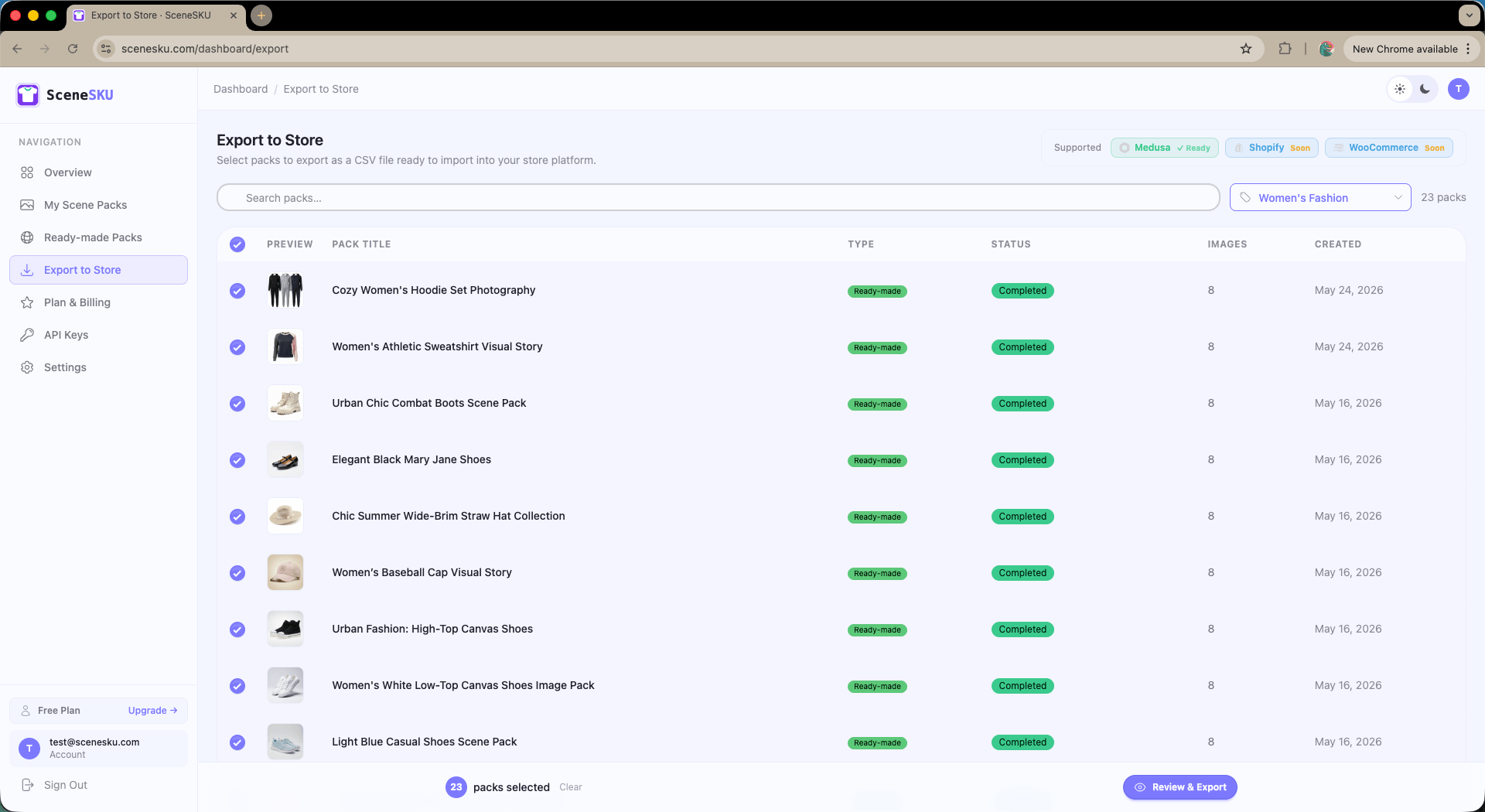
SceneSKU’s Export to Store feature lets you select any number of ready-made product scene packs — complete with professional AI-generated product photography, titles, descriptions, variants, and SEO metadata — and download a platform-ready CSV file in seconds.
No writing. No formatting. No hunting for royalty-free images. Just select, click, download, import.
What You Get in Every Export
Each exported product includes everything a real store product needs:
- Product title and description — human-readable, ecommerce-ready copy
- SEO title and description — meta fields ready for your store’s SEO setup
-
Product handle/slug — auto-generated from the title (e.g.,
elegant-black-mary-jane-shoes) - Variants — size, color, or custom option combinations with full cartesian expansion (Color × Size = all variant rows)
- Multiple product images — all scene images included as separate image columns, not just the thumbnail
- Product type, tags, and categories — pre-filled for clean catalog organization
How It Works: 3 Clicks to a Fully Stocked Test Store
Step 1 — Select your packs
Browse the ready-made pack library, filter by category (Women’s Fashion, Footwear, Accessories, etc.), and check the packs you want. You can select all packs on the page — or select all across your entire catalog — with a single click.
Step 2 — Review and choose your export format
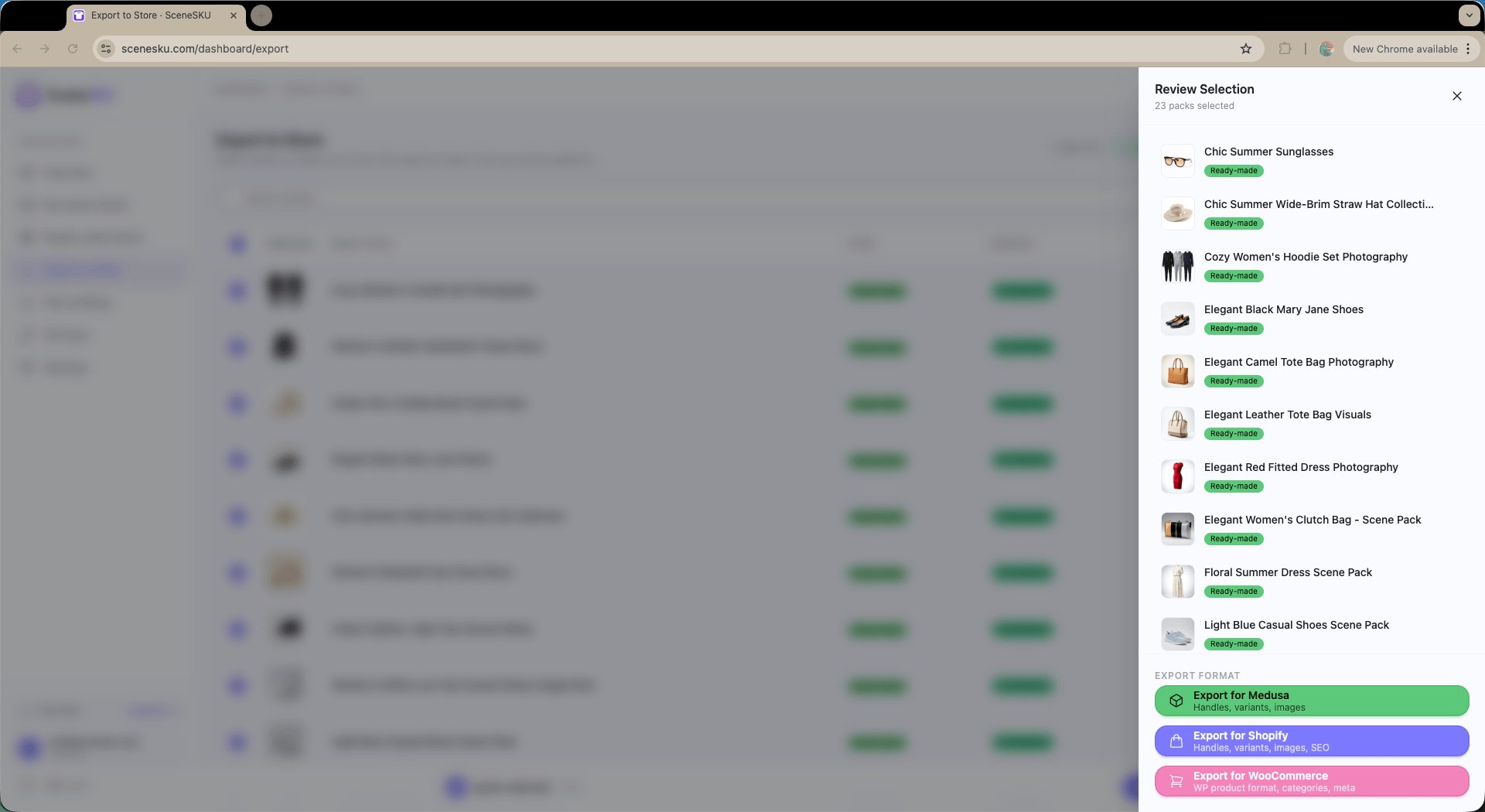
A review panel slides in showing your selected packs. Pick your platform: Medusa is ready now, with Shopify and WooCommerce support coming soon.
Step 3 — Download and import
Click Export for Medusa. A CSV downloads instantly — formatted exactly to the platform’s import template. Open your store’s admin panel, go to Products → Import, upload the file. Done.
Your store goes from empty to stocked with 20+ realistic products in under 5 minutes.
Why This Beats Generic Mock Data Generators
Most mock data tools generate random, unusable product names like “Product 7” or “Generic Widget Blue.” They rarely include proper images, and their CSV output rarely matches the exact column format required by real store platforms.
SceneSKU exports real, curated products — the same ready-made packs used for live storefronts — so your test store looks and behaves like a real one.
| Faker / Seed Scripts | Manual CSV | SceneSKU Export | |
|---|---|---|---|
| Real product images | ❌ | ❌ | ✅ |
| Proper variants | ❌ | Manual | ✅ Auto-generated |
| SEO metadata | ❌ | Manual | ✅ Included |
| Platform-ready format | Maybe | Error-prone | ✅ Exact template |
| Time to populate 20 products | 30+ min | 1–2 hours | < 5 min |
Perfect Use Cases
Testing checkout flows — You need products with variants (size S/M/L, color options) to test add-to-cart, inventory rules, and order creation. Manually setting up 10 products with 3 variants each is tedious. Export 10 packs in one click.
Building store demos — Pitching a client a new storefront design? Populate their demo store with polished fashion and lifestyle products instead of Lorem Ipsum product names.
Staging environment resets — When you reset your staging database, re-importing a saved CSV restores your test catalog in seconds.
Theme and layout testing — Need products with long titles, short titles, multiple images, and single images to stress-test your product page layout? Select a varied mix and export.
Seed data for CI pipelines — Store your exported CSV in version control and use it as deterministic seed data for integration tests against a real Medusa backend.
Supported Platforms
| Platform | Status |
|---|---|
| Medusa | ✅ Ready |
| Shopify | 🔜 Coming soon |
| WooCommerce | 🔜 Coming soon |
Get Started
Export to Store is available on SceneSKU’s Pro plan. Browse the ready-made pack library, select your products, and have your test store stocked before your next coffee.